
What edge AI actually means in video surveillance
TL;DR
Edge AI in video surveillance means running AI models on the camera or a nearby edge device, so video is analyzed where it's captured rather than being sent to a server first. Sighthound Compute Node works this way: it reads license plates and vehicle attributes on the device, keeps that data inside your network, and sends only structured results upstream.
This article is for informational purposes and is not legal advice. Consult your organization's counsel for guidance specific to your jurisdiction and workflow.
Key takeaways
Edge AI processes video on the camera or a connected edge device, so analysis happens at the source rather than on a remote server.
On-device processing keeps plate and vehicle data within the customer's network, supporting privacy and data-residency requirements.
Only metadata, event clips, and structured results cross the network, which cuts bandwidth against streaming continuous high-resolution video.
Edge processing keeps running offline, so sites with weak or no connectivity still get usable analytics.
Sighthound Compute Node runs ALPR+ and Vehicle Analytics at the edge and exports results over a REST API.
The Compute Node turns existing IP cameras into AI endpoints, while the Compute Camera carries onboard compute.
What does edge AI mean in video surveillance?
Edge AI is the practice of running AI models on a camera or a connected edge device, so footage gets analyzed at the source. The model reads each frame locally and produces a result on-site. No raw video has to leave the building first.
Compare that with a cloud or central-server setup. There, cameras push full video to a remote server, and the analysis happens after the upload. That design depends on steady bandwidth and a working connection.
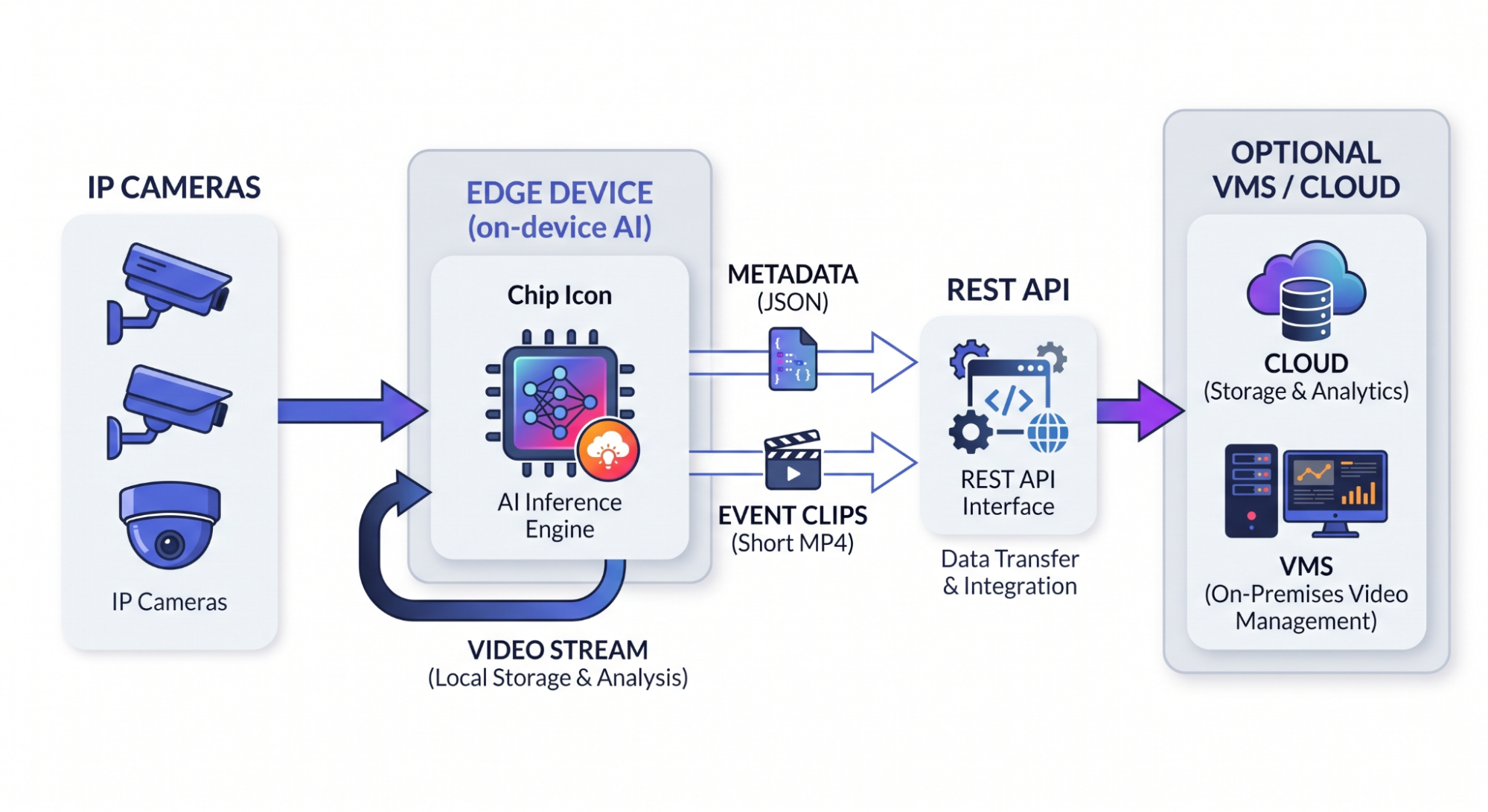
Architecture diagram showing IP cameras feeding an edge device that runs AI locally before sending results.
Automatic License Plate Recognition (ALPR) shows the difference well. On an edge device, the plate gets read as the vehicle passes, and the system outputs the plate text on the spot. Nothing waits for an upload.
What runs on the edge, and what gets sent upstream?
Here's the short version, the heavy work runs on the device, and only light data leaves it. The model detects and reads locally. What travels the network is a record, a clip, or an alert, not the whole stream.
For a vehicle use case, that record can include the plate text and make, model, color, and generation (MMCG) attributes. The footage itself can stay put.
| Stage | Edge AI (on-device) | Cloud / Server-based |
|---|---|---|
| Where the model runs | On the camera or edge device, at the source | On a remote server after upload |
| What crosses the network | Metadata, event clips, and structured results | Continuous high-resolution video |
| Network dependency | Runs offline; no internet needed for analytics | Needs steady connectivity |
| Data residency | Inside your network | Sent off-site for processing |
| Cloud or VMS link | Optional, after local processing | Core to the design |
This is an architecture comparison, not a performance benchmark.
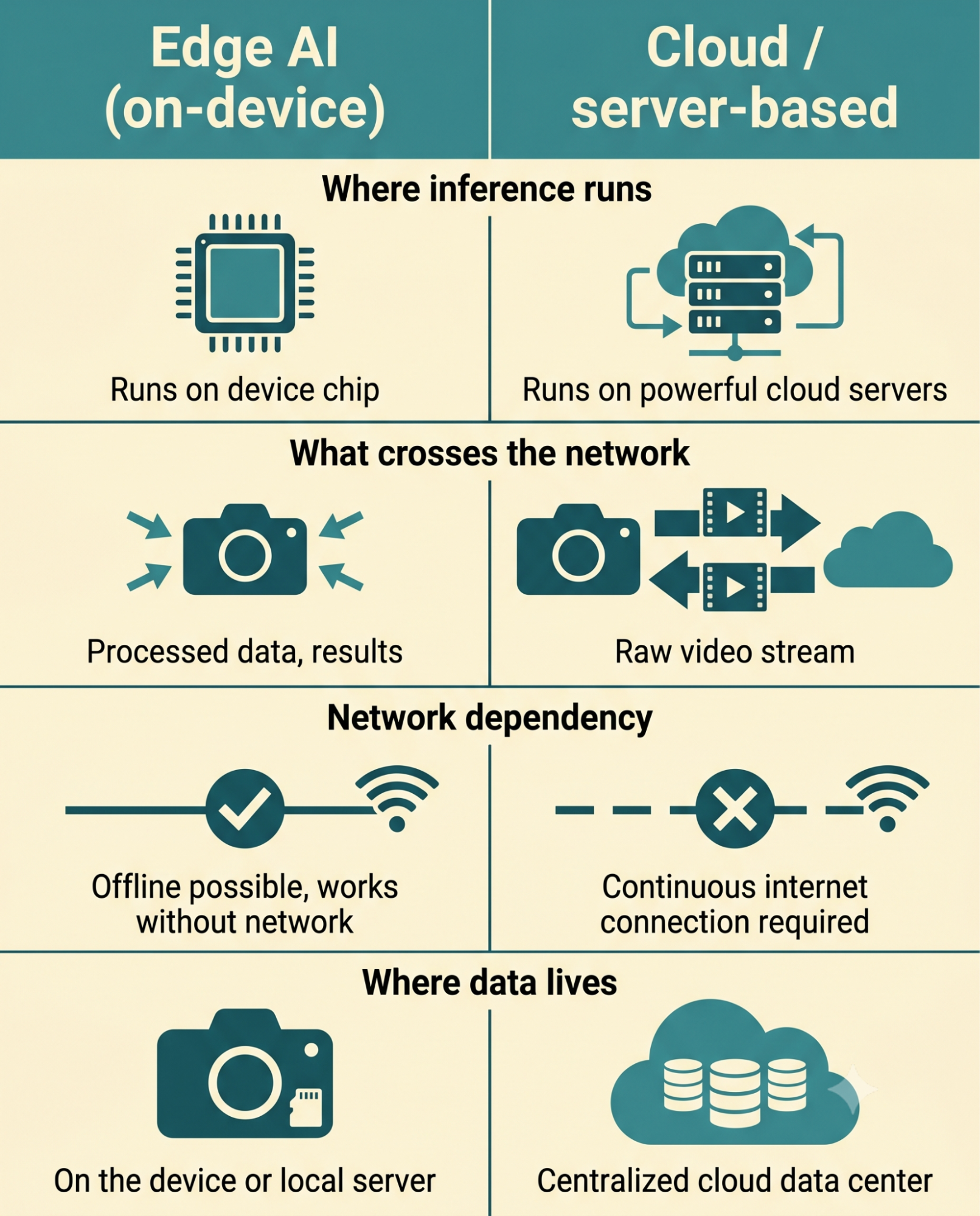
Infographic comparing edge AI and cloud video analytics across where processing runs and what data travels.
Why does processing video on-device matter?
For a security team weighing options, the split changes four practical things:
Latency. Analysis happens at the source, so an alert can fire without a round trip to a server.
Bandwidth. The network carries metadata and short event clips instead of continuous high-resolution feeds.
Data residency. Plate and vehicle data stay inside your own network.
Offline operation. The device keeps working at sites with poor or no connectivity.
Data residency is the one that tends to matter most in regulated settings. When personal data never leaves the premises, it's easier to reason about obligations under rules like the on-device video redaction of the EU's GDPR. Local processing isn't compliance on its own, but it shrinks the surface where sensitive video can be exposed.
How does an edge AI video pipeline work?
A working edge pipeline runs in four steps:
Cameras stream in. IP cameras send video over RTSP or ONVIF/RTSP.
The edge device runs inference. AI models process each stream locally, on the device.
Results export. Structured output leaves over a REST API and Docker-based pipelines.
Optional integration. Results can flow to a Video Management System (VMS) or the cloud after local processing.
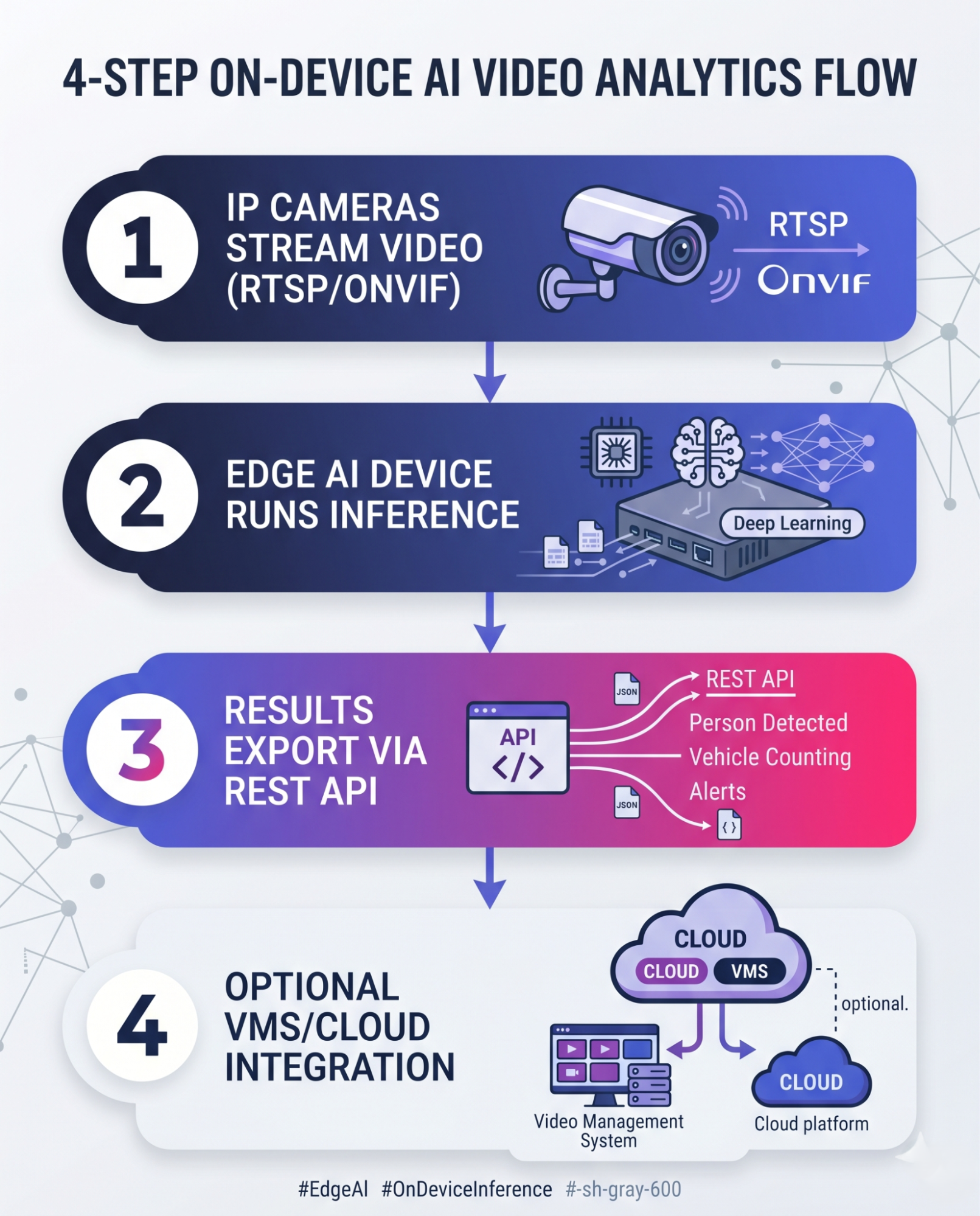
Four-step infographic of an edge AI video pipeline from camera input to optional cloud integration.
Where does edge AI show up in real deployments?
The pattern fits anywhere cameras outnumber the bandwidth available to move their video. Common deployments:
Parking enforcement and analytics, including entry and exit reads, permit checks, and retail or QSR lots.
Vehicle access control, gating entry to authorized vehicles.
Mobile and in-vehicle ALPR, where patrol units run offline in areas with weak coverage.
Perimeter and campus monitoring, covering restricted zones and staff entrances.
Smart-city traffic, running vehicle analytics on site.
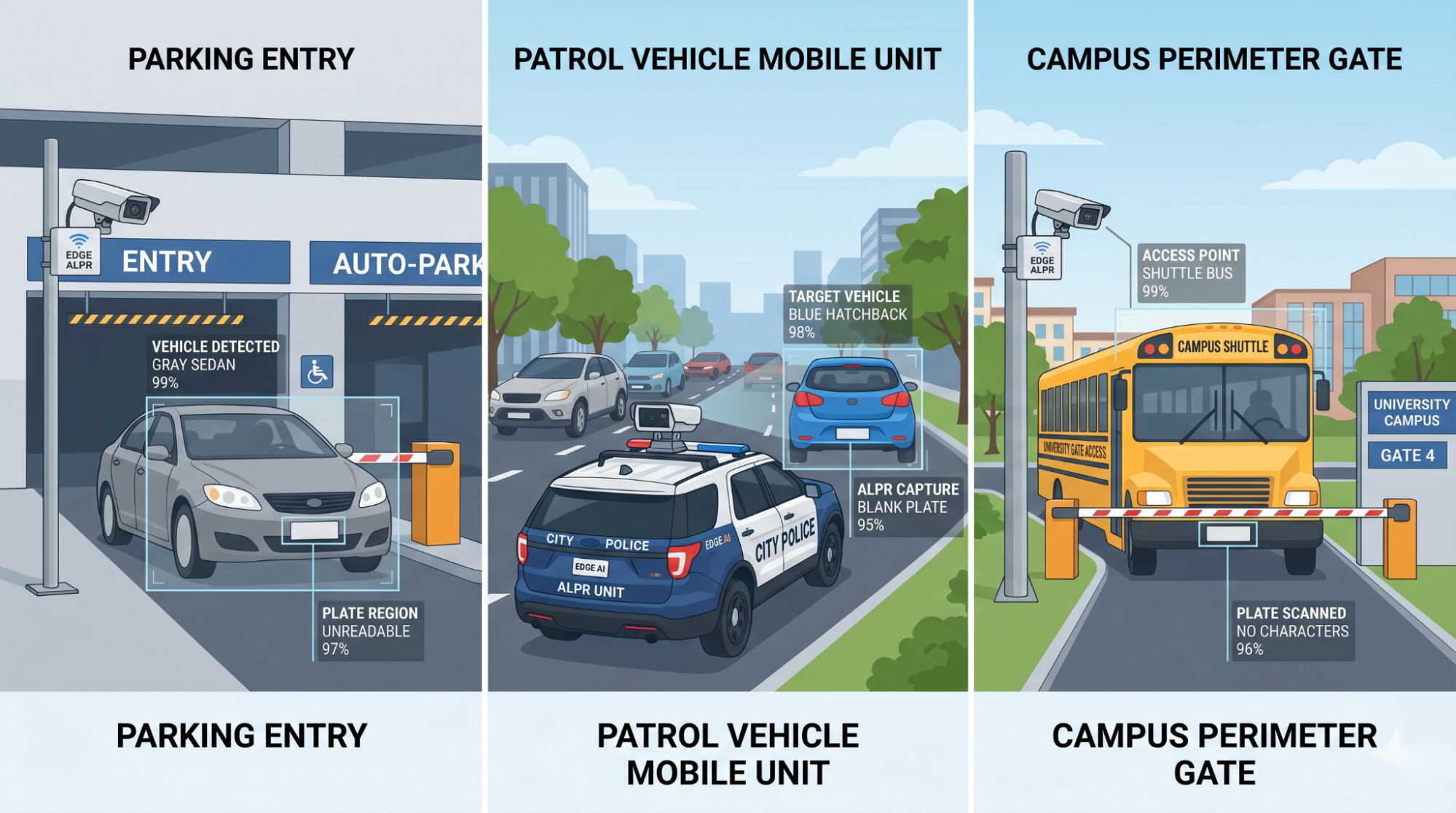
Illustration of edge ALPR deployments at a parking entry, a patrol vehicle, and a campus gate.In each case, the framing is analytics and safety. The point is structured vehicle data, not blanket monitoring.
How Sighthound Compute Node helps
Sighthound Compute Node runs ALPR+ and Vehicle Analytics at the edge with no cloud dependency, keeping plate and MMCG data inside the customer's network. It outputs results over a REST API, with optional integration to a VMS or cloud after processing.
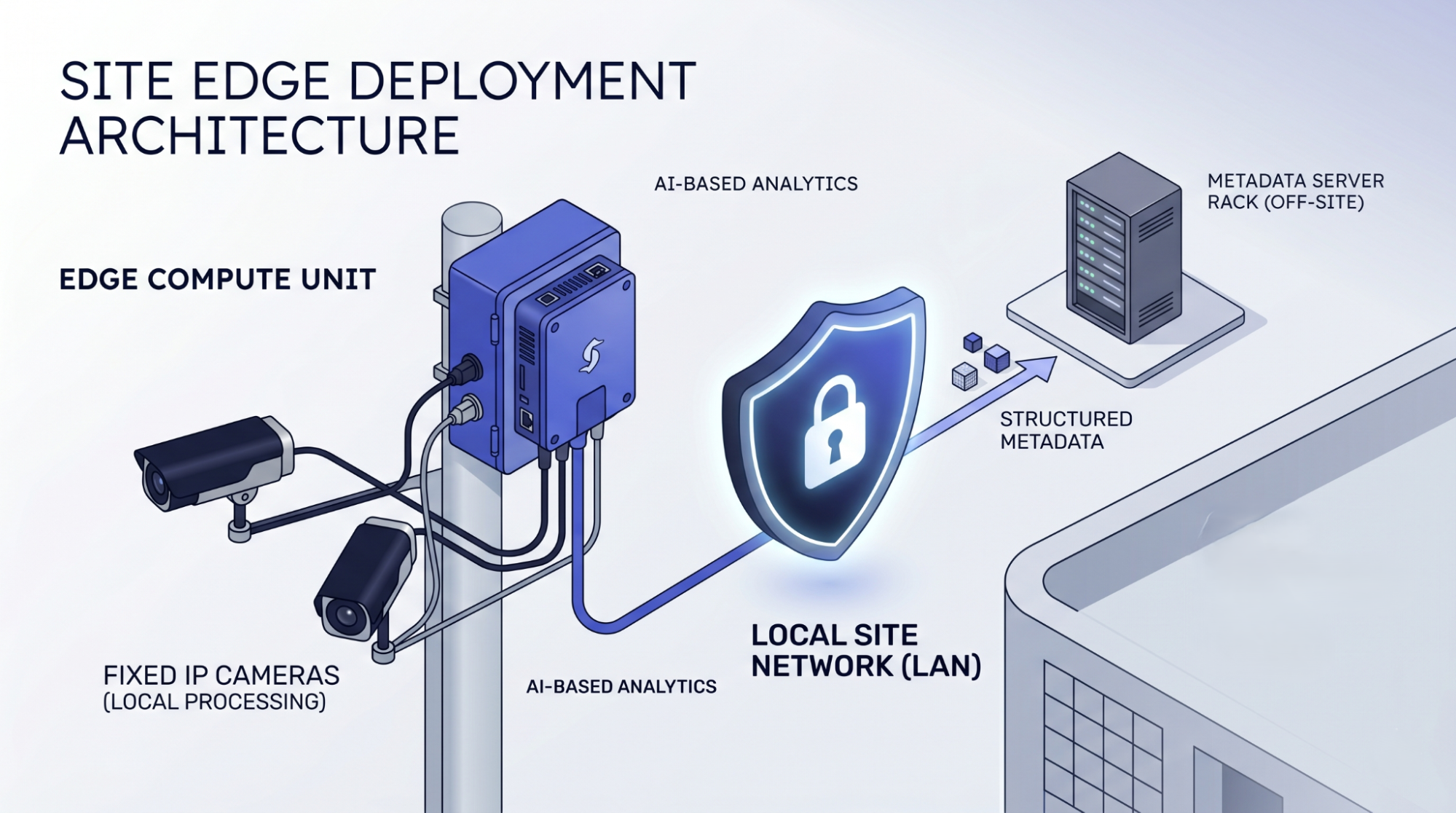
Edge compute device connected to fixed IP cameras, processing vehicle data on the local network. Two hardware paths cover most setups.
The Compute Node drops in alongside your existing IP cameras and turns them into AI endpoints over RTSP. The Compute Camera carries the computer onboard, for fixed installs where you want the camera and the analytics in one unit. Both run fully on-site and keep working when the network doesn't.
Want to see AI-powered LPR in action? Test Drive ALPR+ now with our sample images.
For business opportunities, explore our Partner Program today.